
Quality Dot-peen marking without sacrificing quality
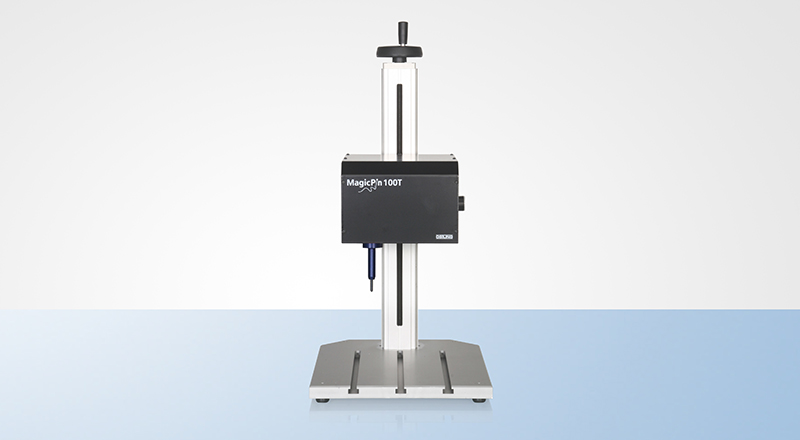
These dot peen marking systems are a low-cost alternative. What do we mean by low-cost? We simply mean that the MagicPin series has been produced with limited ability for expansion, NOT by reducing the quality of the equipment or printing result.
The MagicPin systems are not expandable to include a 3rd axis rotation axle, automatic electronic elevator axle, vehicle identification plate magazine etc. This saves manufacturing costs without needing to sacrifice build quality - resulting in a better price for the end-user.
The MagicPin systems are manufactured in Germany and are suited to industrial applications, including DATA Matrix™ codes and serial numbers as well as graphics by means of importing plotter files.
All-in-all, the MagicPin systems represent a smaller budget without getting a worse marking result or less durability
MagicPin systems is available as a Table Model.

|
Technical Data: MagicPin 100 T
|
|
|
L x W x H
|
188 x 207 x 141 mm
|
|
Weight
|
4.5 Kg
|
|
Marking Field
|
100 x 100 mm
|
|
Resolution
|
0,1 mm
|
|
Speed
|
Depends on marking parameters
|
|
Controller Options
|
UMC eco, UMC box / Not UMC 112
|
|
Needle lsystem
|
WE2, WP2
|
|
Power Supply
|
230 V, 50 Hz / opt. 115 V, 60 Hz
|
|
Compressed Air
|
max.6 bar, 6 mm
|

MagicPin Controllers
The MagicPin100T can be controlled with either our PinMarkUMC eco or UMC box controller. For further technical specifications about the control unit please see the appropriate data sheet.
The UMC Eco controller directly controls the Pinmark unit - with a graphical display. The UMC Box controller is an interface between the pinmarker and a computer - onto which software is loaded.
PinWare 4 software
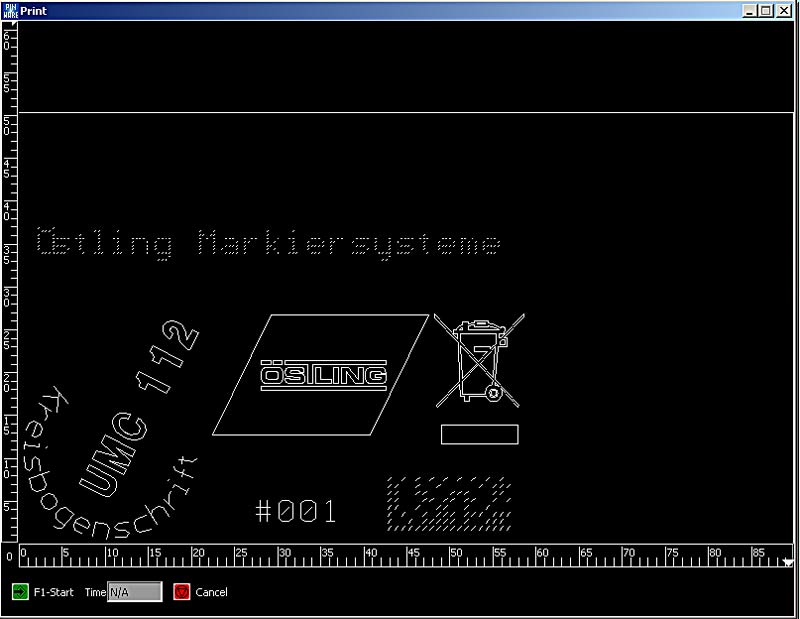

The PinWare software allows the user to easily program in the text, numbers, graphics or barcode required.
A WYSIWYG display creates an instant preview of your marking, with the ability to import non-printing characters or logos such as the outline of the product being marked!
A variety of sequential numbering options are provided, including date and time fields.
The software also provides statistics such as the time taken to complete the mask.
A "teach-in" function means that the operator is able to physically see the position of the needle move in increments to it's starting position for the mark currently being programmed.
Demonstration Videos
These videos demonstrate the operation of the MagicPin systems.